
Custom Web Services: The Smart Way to Scale Your Business...
Read MoreThe Path to Reliable Software: A Guide to Effective Testing
In the fast-paced world of software development, ensuring the quality, functionality, and reliability of a product is paramount. Software testing plays a crucial role in achieving these goals by identifying issues early, minimizing risks, and boosting user satisfaction. In this guide, we’ll explore the fundamentals, benefits, types, and best practices of software testing.
What is Software Testing?
Software testing is the process of evaluating and verifying that a software application or system meets specified requirements and functions as expected. It involves checking for bugs, ensuring the software performs optimally, and confirming that it’s user-friendly and secure.
Why is Software Testing Important?
Here are some key reasons why thorough testing is essential:
- Detect Bugs Early: Finding and fixing bugs before the software reaches users saves time, money, and prevents reputational damage.
- Enhance Security: Testing helps identify potential vulnerabilities, minimizing risks of data breaches and ensuring user safety.
- Boost User Satisfaction: Quality assurance ensures a smooth user experience, which increases customer satisfaction and brand loyalty.
- Optimize Performance: Testing validates that the software can handle expected loads and performs well under various conditions.
Types of Software Testing
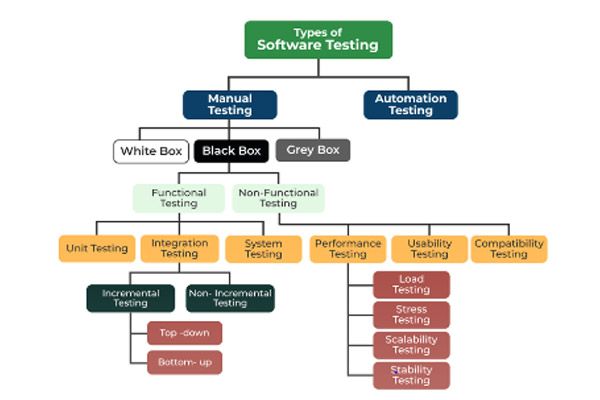
There are multiple types of software testing, each serving unique purposes and covering different aspects of an application’s functionality and performance:
- Manual Testing: Human testers manually check the software by following predefined steps and assessing if it works as expected.
- Automated Testing: Uses automated tools to perform repetitive tasks, making it faster and more reliable for regression testing and large projects.
- Functional Testing: Verifies that each function of the software operates according to requirements.
- Performance Testing: Tests the speed, responsiveness, and stability of the software under load.
- Security Testing: Ensures that the software is protected against unauthorized access and threats.
- Usability Testing: Evaluates the ease of use and user-friendliness of the application.
- Compatibility Testing: Checks that the software works across various devices, browsers, and operating systems.
Software Testing Lifecycle (STLC)
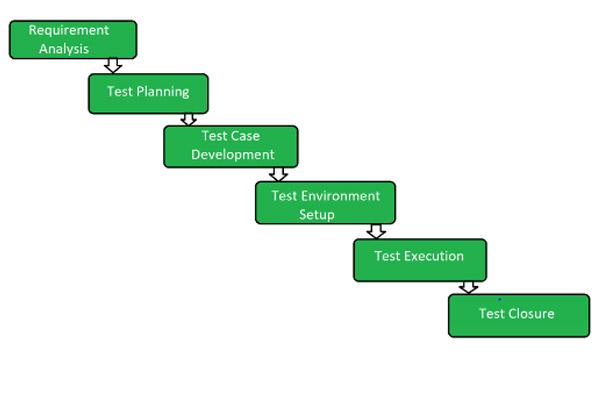
The STLC outlines a systematic approach to testing, involving several distinct phases:
- Requirement Analysis: Understand the testing requirements based on client expectations.
- Test Planning: Outline the strategy, objectives, and schedule for testing.
- Test Case Development: Design and document test cases that cover various scenarios.
- Environment Setup: Set up the necessary hardware, software, and network configurations.
- Test Execution: Run the tests as planned and document the outcomes.
- Test Closure: Wrap up the testing process, review results, and prepare reports.
Manual vs. Automated Testing
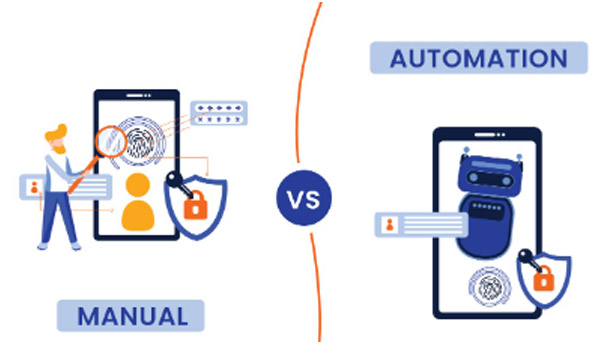
While both manual and automated testing have advantages, understanding when to use each is essential:
- Manual Testing is ideal for exploratory, usability, and ad-hoc testing. It allows testers to analyze user behavior and respond to unexpected scenarios.
- Automated Testing is best suited for regression testing, load testing, and scenarios that require repetitive tasks, making it efficient for long-term projects.
Best Practices for Effective Software Testing
Adhering to best practices in software testing can ensure a more efficient and reliable testing process:
- Plan and Prioritize: Identify critical areas and prioritize testing based on user impact and application complexity.
- Maintain Clear Documentation: Document test cases, results, and issues clearly to ensure transparency and repeatability.
- Perform Regular Regression Testing: Test previously validated functionalities to confirm they’re not broken by new updates.
- Automate Where Possible: For repetitive or high-volume testing, automated tools save time and reduce errors.
- Encourage Continuous Learning: Software and testing tools evolve constantly, so testers should stay updated with new trends, tools, and methodologies.
Emerging Trends in Software Testing
As technology evolves, so does software testing. Here are some trends to watch:
- AI and Machine Learning: These are enhancing test automation, improving error detection, and optimizing test coverage.
- Shift-Left Testing: Testing earlier in the development process helps identify defects sooner, reducing time and costs.
- Continuous Testing: Integrating testing within the CI/CD pipeline supports faster release cycles and enhances agility.
- Codeless Testing Tools: These tools allow testers without programming skills to automate tests, expanding the accessibility of automation.
Conclusion
Software testing is the backbone of delivering high-quality, reliable applications. By understanding different testing types, using best practices, and staying updated with emerging trends, organizations can reduce risks, enhance security, and achieve customer satisfaction. Whether manual or automated, investing time and effort in a comprehensive testing strategy is essential for a successful product launch.
Effective software testing doesn’t just help deliver a product; it helps deliver an experience that users can trust.
Categories
Recent Articles
Custom Web Services: The Smart
Custom Web Services: The Smart Way to Scale Your Business...
Read MoreThe API Revolution: Driving the
The API Revolution Driving the Future of Web Services In...
Read More🌐 Web Services: Fueling Digital

🌐 Web Services: Fueling Digital Innovation for Modern Businesses In...
Read More